Unified Modeling Language (UML)
Table of Contents
UML
Class diagram
Figure 1 shows an example of a class diagram.
Personis a (extension of)Mammal,Personhas a public attribute:name,Personimplements theFlippableinterface,Personhas aBackPack,- the
eatMyApplemethod is private, - and the
doBackFlipmethod is public.
Note the different type of arrows connecting the nodes.
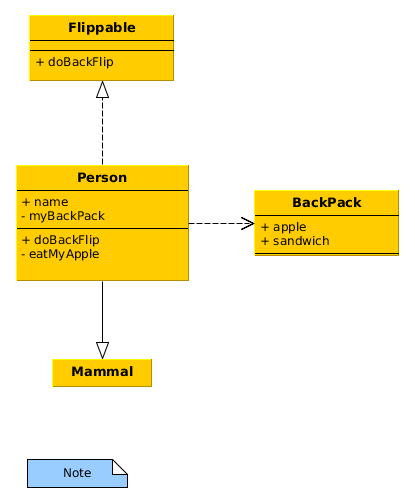
Figure 1: Example of a UML class diagram generated with yEd.

Figure 2: Example of a UML class diagram generated with PlantUML.
yEd
- Graphs are saved as
graphmlfiles (an XML format), but you can also export them as PNG or SVG. ctrl fto search a graph, you can also dock the search window. Then use the Nodes tab to select based on label text (or however else you want to search it).Alt + Shift + gto use an organic layout of the graph.Alt + Shift + hto use the heirarchical layout of the graph.- In the property of a UML node there are textboxes that allow you to enter methods and attributes
Examples
Database schema
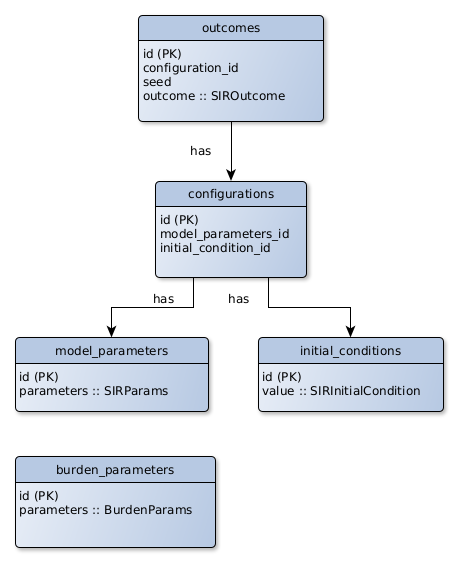
Figure 3: Example of a visualisation of a database schema generated with yEd.
PlantUML
See my PlantUML Gallery
- There is a spacemacs layer for PlantUML.
- The file extension is
.puml. - To generate an SVG (PNG is the default) use the following command:
java -jar <path/to/plantuml.jar> --svg <my/diagram.puml>
The following demonstrates how to display multiplicity in a class diagram in PlantUML.
@startuml
  zeroOrOne |o--|| exactlyOne
  exactlyOne ||--o{ zeroOrMany
  zeroOrMany }o--|{ oneOrMany
  oneOrMany }|--o| zeroOrOne
@enduml